Microsoft 365 configuration backup and drift detection
GlacierPoint Snapshot backs up the configuration of your Microsoft 365 tenant, 484 setting types across 9 admin centers, and shows you exactly what changed between any two backups. When a change was a mistake, you pick the settings you want back and restore them, with a preview first and a rollback after.
Who it is for
It is for administrators and managed service providers who need an undo for tenant settings: after a wrong click, after a change nobody remembers making, or after an admin account was misused. It also helps anyone asked what changed since last month, who would rather answer from evidence than from memory.
If you keep your configuration as code with Microsoft365DSC and are happy maintaining it, that remains a sound choice. Snapshot suits teams who would rather back up, compare and restore from an app and a portal.
How a run goes
- Sign in to the portal with your work email and a six-digit code, then install the Windows app and connect it to your workspace.
- Pick the admin centers and sign in to Microsoft with your administrator account. A backup asks for read permissions only, and nothing in the tenant changes.
- Compare any two backups, or a backup with the live tenant, down to the single setting that differs.
- To restore, tick what you want back. The preview lists what would be recreated or updated, and nothing is written until you confirm.
What you get
- Backups of 484 setting types across Microsoft Entra, Intune, Exchange, Defender, Purview, SharePoint, Teams, Power Platform and the Microsoft 365 admin center.
- A comparison grouped by workload and setting type, with noise such as modification times left out.
- Restore of 386 setting types by the app itself, and a guided walk-through or a PowerShell script for the rest.
- A journal and a rollback for every change a restore makes.
- Encrypted storage in the portal or a vault folder on your own computer, and scheduled backups through an app registration and certificate that you own.
What it does not do
- It backs up configuration only. Mail, files and chats are never read, so it does not replace a backup of mailboxes or OneDrive.
- Not every setting type can be written back by the app: 98 of the 484 are restored by hand, with the walk-through or the script.
- A restore never deletes anything, and risky items it recreates come back switched off.
- GlacierPoint keeps no standing access to your tenant.
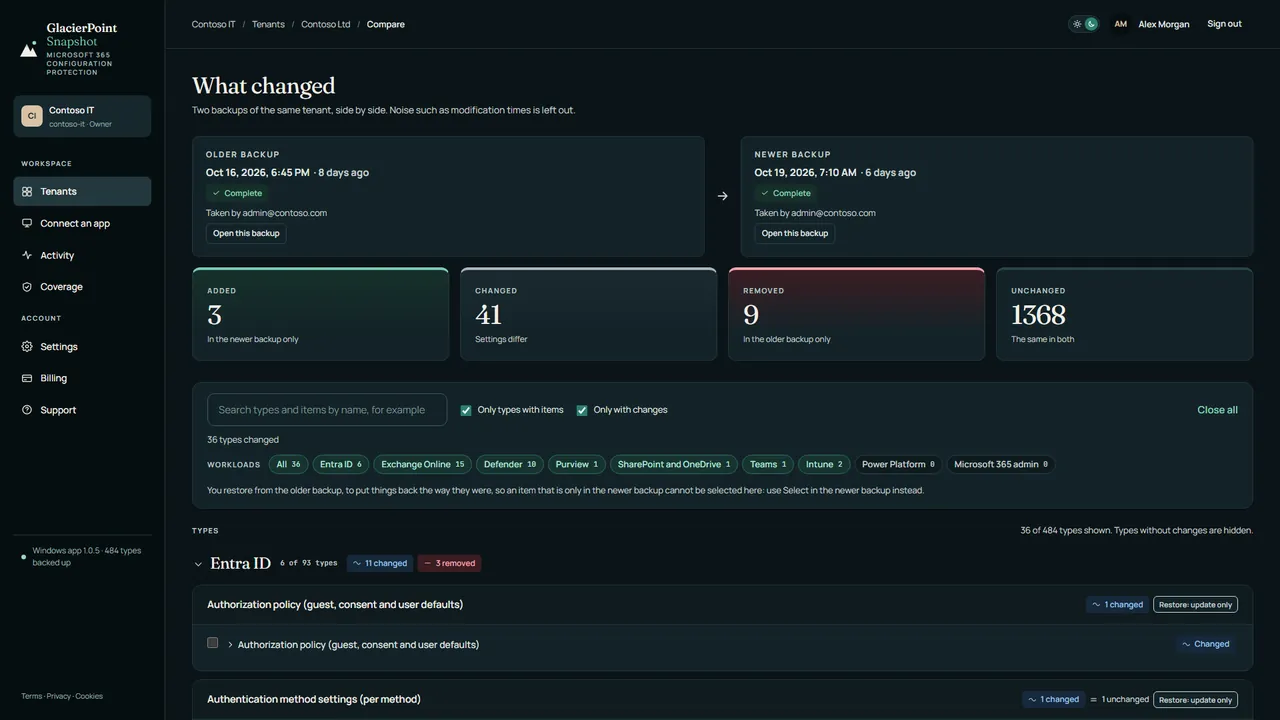
The free preview needs no card: a sample backup of 10 setting types from your own tenant, up to 3 times, with browsing and comparing. Restore is not part of the preview.
Newest articles
-
How to detect configuration drift in Microsoft 365
Detect configuration drift in Microsoft 365: audit log alerts, a scheduled export and diff, Microsoft's own monitors, and what each one misses.
-
How to export Intune configuration profiles with PowerShell
Export Intune configuration profiles to JSON with PowerShell and Microsoft Graph: settings catalog, templates and compliance policies, with assignments.
-
What happens when an Intune policy is deleted?
When an Intune policy is deleted, devices lose it at their next check-in, but some settings stay behind. What Microsoft documents for each policy type.
Articles from every GlacierPoint product, newest first, are on the articles page.