Expiry reminders for app secrets and certificates in Microsoft 365
GlacierPoint Remind lists what in your Microsoft 365 tenant can expire or quietly break, names the owner of each item, and warns you before the date arrives. You hear about a client secret or a push certificate weeks ahead, not from the outage.
Who it is for
It is for administrators and managed service providers who have had an integration, a single sign-on app or device enrollment stop because a date passed and nobody was watching.
It helps most in tenants with many app registrations and no clear owner for each one.
How a run goes
- Create your workspace with your work email and a six-digit code, then download the Windows app and approve it with the code it shows.
- Sign in to Microsoft with your administrator account. The app reads eight sections with read permissions only and looks up the mail records of your domains.
- The result goes to the portal sealed.
- The report shows what expires in the next 30 days and what already expired, then every item with its owner, the days left and what to do.
What you get
- One inventory of eight kinds of items: app registration secrets and certificates, enterprise application signing certificates, applications without an owner, unused applications, domain mail records, Intune certificates and tokens, Microsoft Entra Connect and cloud sync, and Conditional Access policies that name deleted objects.
- An owner for each item, taken from Microsoft Entra ID or assigned by you in the portal.
- MX, SPF, DKIM and DMARC records compared with what Microsoft 365 expects.
- On the Watch and MSP plans, a daily run and warning mails 30, 14, 7 and 1 days before each date and on the day.
- Handled and ignored states, with dates and reasons kept for audit, and the report as a page, a PDF and a CSV.
What it does not do
- It never rotates or renews anything. Remind holds no secret and no private key: it reads the names and dates of credentials, never their values, and renewals stay with you.
- Warnings follow the newest run and cover what that run could read, so they depend on the daily run and on mail delivery.
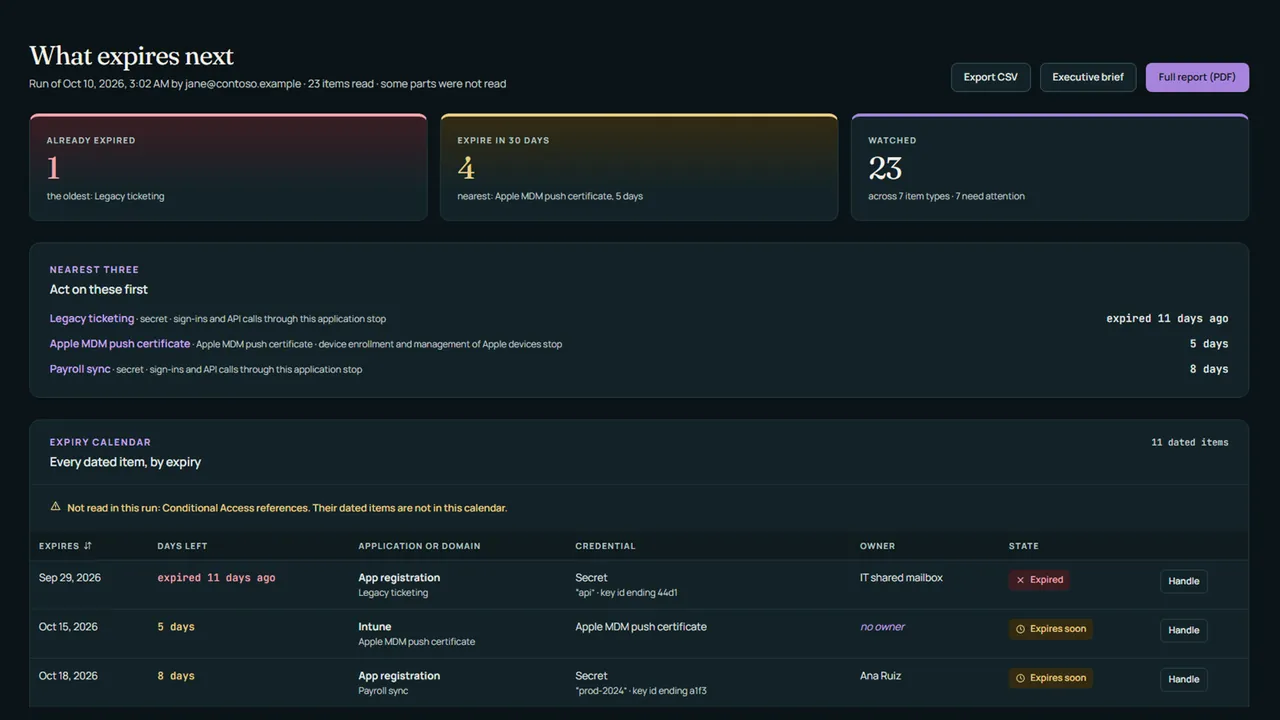
The free preview needs no card: one tenant, up to 3 runs, the headline card and every section with its counts and its three nearest items, with 30 days of history. Warning mails and exports come with a plan.
Newest articles
-
How to renew an expiring app registration secret or certificate
How to renew an expiring app registration secret or certificate without downtime: add a new credential, move everything to it, then remove the old one.
-
How to get an alert before an Entra app secret expires
Set up an Entra app secret expiration alert: a daily Graph PowerShell script that mails each owner, a Logic App option and an admin center fallback.
-
How to find expiring app registration secrets with PowerShell
Find expiring app registration secrets and certificates with Microsoft Graph PowerShell or the Entra admin center, then sort, export and assign owners.
Articles from every GlacierPoint product, newest first, are on the articles page.